Executive Summary
Small businesses are moving to the cloud faster than they can secure it. The result is a growing gap between what's deployed and what's actually protected. This paper explains why that gap exists, why conventional approaches don't close it, and what a practical, cost-effective cloud security strategy looks like for organizations that don't have a dedicated security team.
Section 01The Problem: Cloud Adoption Outpaces Security
The cloud made things easy. An engineer can spin up a new database, a storage bucket, or an entire virtual network in minutes. No purchase orders, no lead times, no hardware to rack. That speed is exactly why small businesses moved to AWS, Azure, and similar platforms in the first place.
Easy to deploy also means easy to misconfigure.
According to Gartner, through 2027, 99% of cloud security failures will be the customer's fault. Not the cloud provider's. Not some nation-state hacking group's. The customer's. IBM's Cost of a Data Breach Report consistently identifies cloud misconfiguration as one of the top initial attack vectors, with the average breach now costing $4.88 million. For a small business, even a fraction of that is existential.
The misconfigurations behind these breaches are rarely exotic. They are mundane, predictable, and preventable:
- S3 buckets left publicly accessible, exposing sensitive files to anyone with a URL
- IAM roles with wildcard permissions, granting far more access than any user or service needs
- Security groups open to 0.0.0.0/0, effectively putting internal services on the public internet
- Databases running without encryption at rest, leaving stored data unprotected if a volume is compromised
- Root accounts without MFA, making the most powerful credential in your environment vulnerable to a single phished password
- API keys and access credentials that haven't been rotated in months or years, sitting in config files and CI pipelines
These aren't theoretical risks. They are the actual findings that security teams deal with every day.
The Shared Responsibility Model
Every major cloud provider operates on what they call the "shared responsibility model." AWS secures the physical data centers, the hypervisors, and the underlying network infrastructure. Azure does the same. That's their side.
Your side is everything else: how you configure your storage, who you grant access to, whether encryption is turned on, how your network is segmented, and whether your logging is actually capturing what matters.
Most small businesses understand this in the abstract. In practice, the line is blurry, and nobody on staff is responsible for checking whether things are configured correctly. The IT generalist who set up the AWS account two years ago has moved on to other priorities. The configuration choices made during initial setup have never been revisited.
That is where breaches come from.
Section 02Why Traditional Approaches Fall Short
Small businesses aren't ignoring security. Many invest in annual penetration tests, comply with industry regulations, and follow the guidance their cloud providers offer. The problem is that these approaches were designed for a world that moved more slowly.
Periodic Assessments Capture a Snapshot
An annual penetration test or compliance audit tells you how things looked on the day the auditor checked. Cloud environments don't hold still. A developer adds a new storage bucket on Tuesday. Someone tweaks an IAM policy on Thursday. A new service gets deployed the following week with default security group rules that were supposed to be temporary.
By the time your next annual assessment rolls around, the environment has drifted significantly from what was evaluated. The audit report from six months ago has little relationship to what's actually running in production today.
Native Tools Generate Noise, Not Clarity
AWS Security Hub, Azure Defender, and similar native tools are capable platforms. They can identify misconfigurations, flag vulnerabilities, and generate alerts. Many organizations turn them on, expecting they'll solve the problem.
What happens next is predictable: the dashboard fills with hundreds of findings of varying severity, described in cloud-provider jargon, with no prioritization based on your specific business context. Someone needs to log in regularly, read the findings, understand what they mean, determine which ones matter, and take action.
For a company with a dedicated security operations center, that's the job. For a small business with an IT generalist who also manages laptops, email, and the office printer, those findings sit unread.
Alert Fatigue
Security tools that produce too many alerts without clear prioritization create their own kind of risk. When every finding is flagged as important, none of them feel urgent. Teams stop checking. Dashboards become wallpaper. The critical finding that actually needed attention gets buried under fifty informational notices about best practices nobody has time to implement.
This isn't a discipline problem. It's a design problem.
Tools that dump raw findings on under-resourced teams are not helping those teams. They're creating the illusion of security coverage.
The Staffing Reality
The cybersecurity talent shortage is well documented. There are roughly 3.5 million unfilled cybersecurity positions globally, according to ISC2. The people who can fill those roles command salaries that start well above $100,000 and climb from there.
For a 50-person company, hiring a full-time security engineer is rarely feasible. Building a security operations center is out of the question entirely. This isn't a failure of priorities. It's simple math. The result is that the majority of small businesses operate their cloud environments with zero dedicated security oversight.
Section 03A Better Model: Continuous Security Posture Management
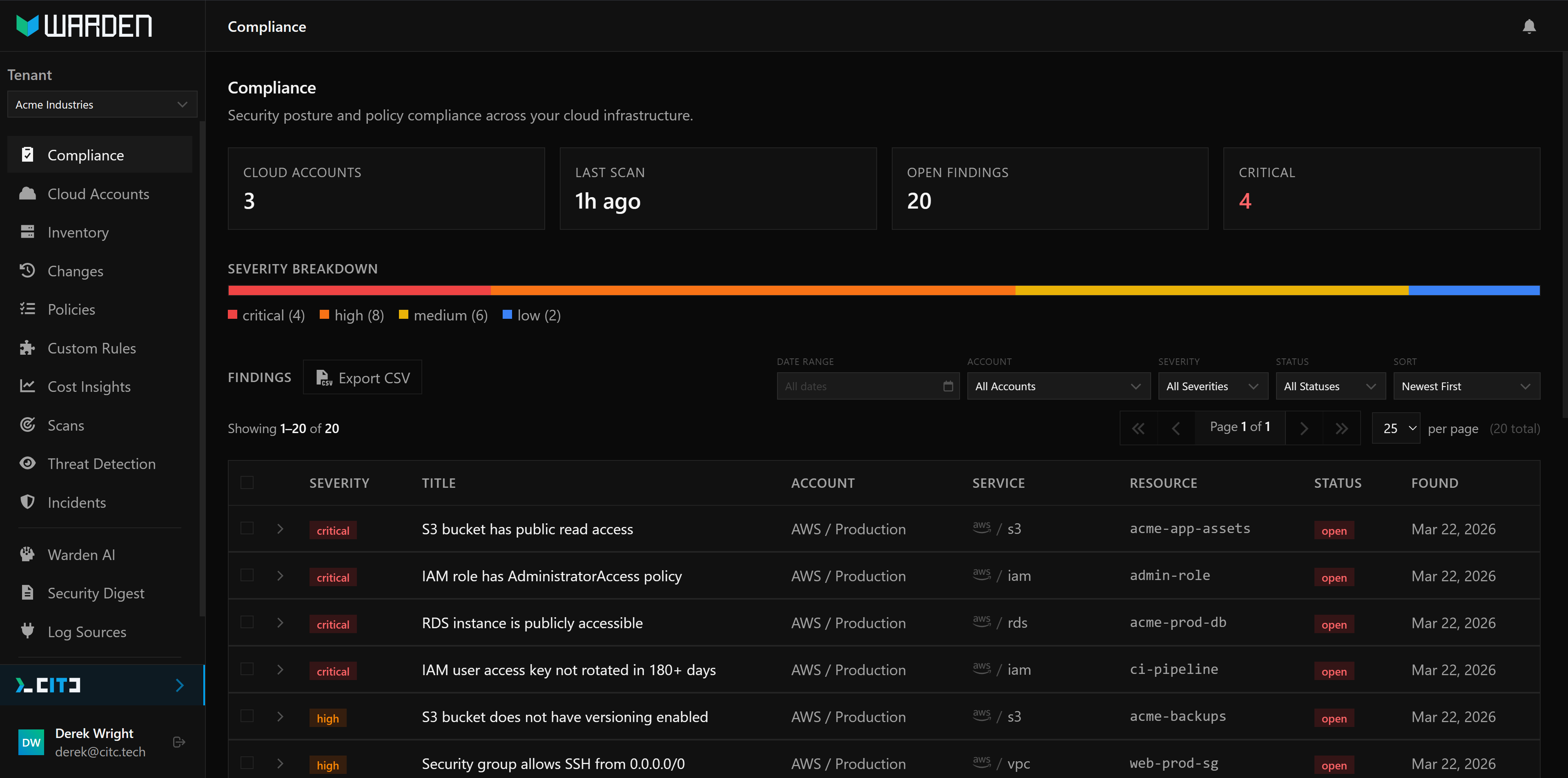
The alternative to periodic assessments and ignored dashboards is continuous, automated security posture management. Instead of checking once a year, you check every night. Instead of generating a wall of unstructured alerts, you produce prioritized, actionable findings tied to real risks.
Automated Scanning Against Hundreds of Policies
A well-designed cloud security platform evaluates your environment against a comprehensive set of security policies on a recurring schedule. Not ten policies. Not fifty. Hundreds, covering the full surface area of your cloud configuration across storage, identity and access management, networking, compute, database, logging, encryption, and container orchestration.
Each policy checks for a specific misconfiguration:
- Is this S3 bucket's access control list granting public read?
- Does this IAM role allow
sts:AssumeRolewith no condition restrictions? - Is this RDS instance publicly accessible?
- Is CloudTrail logging enabled in all regions?
- Are KMS keys configured for automatic rotation?
- Does this security group allow SSH from any IP address?
- Are EKS pods running as root with privileged containers?
- Is Azure Storage configured to allow access over HTTP instead of requiring HTTPS?
These are specific, binary checks. The bucket is public or it isn't. The policy is overly permissive or it isn't. There is no ambiguity and no interpretation required.
Drift Detection
The real value of continuous scanning isn't the initial assessment. It's what happens on day two.
When your environment changes, whether by deliberate action or accidental misconfiguration, the next scan picks it up. A new finding appears. The security posture delta between yesterday and today is clear. You can see exactly what changed and when.
This turns cloud security from a periodic project into a daily practice. Instead of wondering whether your environment has drifted since the last audit, you know. Every morning.
Multi-Cloud Coverage
Many small businesses use more than one cloud provider. Maybe the primary infrastructure runs on AWS, but a few services live in Azure because of a specific vendor integration or an acquisition. Maybe you started on Azure and are migrating workloads to AWS incrementally.
Security tools that only cover one provider create blind spots. A unified view across AWS and Azure, with consistent policy coverage and consolidated findings, eliminates the need to check two dashboards, correlate two sets of alerts, and maintain two mental models of your security posture.
Compliance Mapping
Regulatory compliance and security best practices overlap significantly. The CIS Benchmarks, SOC 2 trust service criteria, and NIST Cybersecurity Framework all require many of the same controls: encryption at rest, access logging, least-privilege IAM, MFA enforcement, and network segmentation.
When your security findings are mapped back to these frameworks automatically, audit preparation becomes straightforward. Instead of scrambling to produce evidence for your auditor, you point to the scan results. Here's what we check, here's the current state, here's the history. The conversation shifts from "do you have controls in place?" to "here's the data."
Section 04The AI Analyst: From Dashboards to Answers
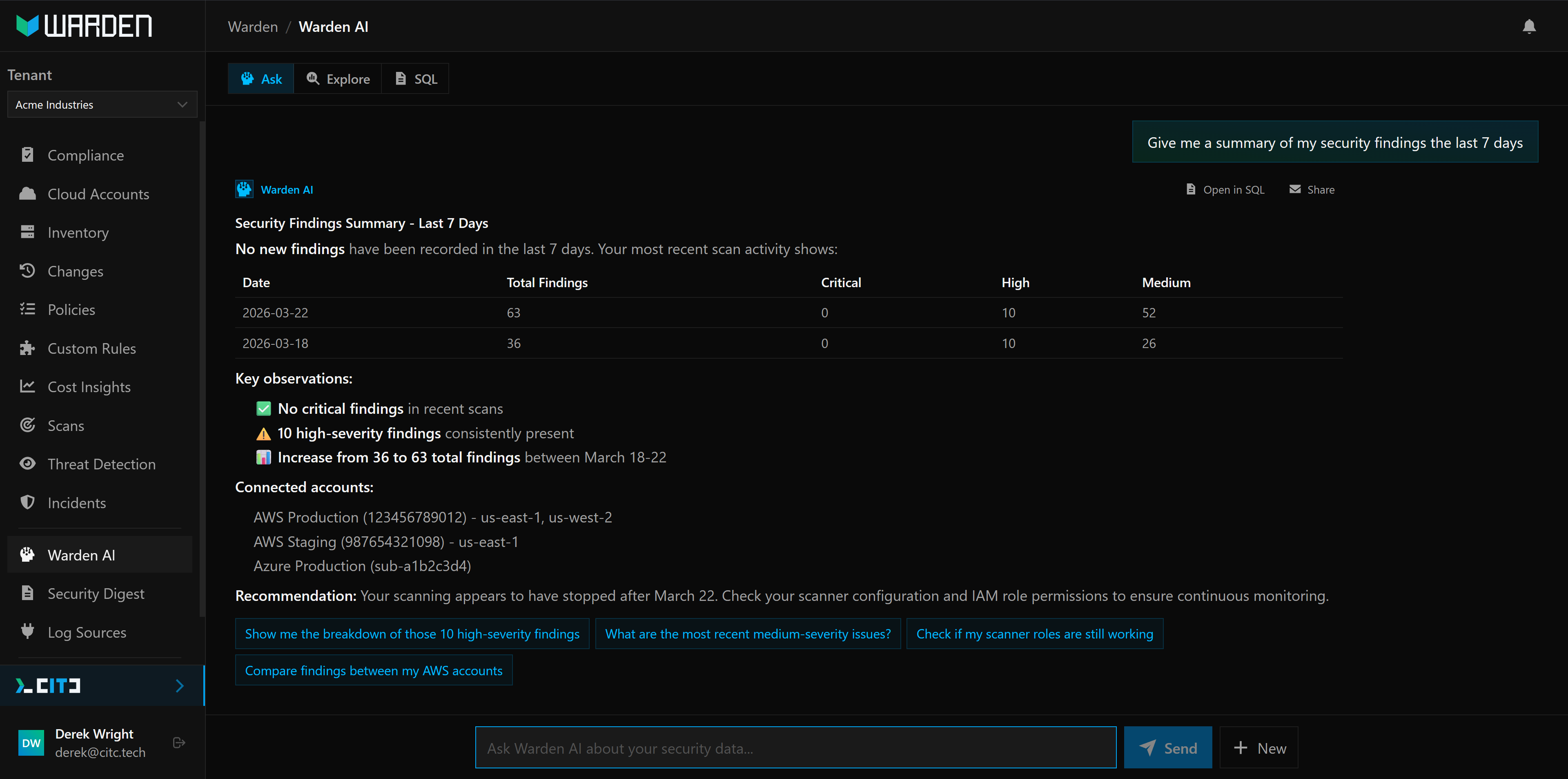
Even with well-organized findings and clear prioritization, dashboards still require the person reading them to know what they're looking at. "IAM policy allows s3:* on resource *" is meaningful to a security engineer. It means nothing to a business owner or an IT generalist whose background is in networking and desktop support.
Plain-English Security Analysis
An AI security analyst sits on top of your scan data and lets you ask questions in natural language:
"Which of our S3 buckets are publicly accessible?"
"What changed since last week's scan?"
"Are we compliant with CIS benchmark requirements for IAM?"
"What are the most critical findings we should fix first?"
"Show me all findings related to encryption."
The response comes back in plain English, with context about why the finding matters and what to do about it. No jargon. No acronyms without explanation. No assumption that you already understand the difference between a bucket policy and an access control list.
This moves cloud security from a specialized skill to an accessible conversation.
The IT director at a 40-person company can get the same situational awareness that previously required a dedicated security analyst.
Threat Detection
Security posture management catches misconfigurations. Threat detection catches suspicious activity.
By monitoring CloudTrail logs and Azure Activity Logs, a security platform can identify behavior that suggests compromise or unauthorized access:
- Unusual API calls: someone invoking
DescribeInstancesorListBucketsacross every region, a pattern consistent with reconnaissance - Privilege escalation attempts: an IAM user attaching administrator policies to their own account
- Impossible travel: a login from Charlotte, NC, followed by a login from Eastern Europe twelve minutes later
- Credential abuse: access keys being used from IP addresses that don't match your known infrastructure
- Configuration tampering: CloudTrail logging being disabled, security group rules being modified outside of normal change windows
These aren't hypothetical scenarios. They are the early indicators of real attacks, and they happen in cloud environments every day. The difference between a breach and a near-miss is often whether anyone noticed the early signals.
Daily Security Digests
Not everyone wants to log into a dashboard. Some stakeholders just need a summary: here's what happened, here's what changed, here's what needs attention.
A daily security digest delivered by email gives decision-makers visibility without requiring them to learn a new tool. The CEO gets a one-paragraph summary. The IT lead gets the details. Nobody has to remember to check.
Section 05Tooling Alone Isn't Enough
Software can find problems. People fix them.
This is the uncomfortable truth about cloud security tooling: detection without remediation is just a more sophisticated way of knowing you're at risk. A scan that identifies 47 critical findings is only useful if someone knows which of those 47 to fix first, how to fix them without breaking production, and how to prevent them from recurring.
The Remediation Gap
For organizations with mature security teams, the path from finding to fix is well-worn. The team triages, prioritizes based on exploitability and business impact, assigns remediation tasks, validates the fixes, and updates the policies to prevent recurrence.
Small businesses don't have that workflow. They have a finding that says "RDS instance is publicly accessible" and a reasonable question: "Okay, but our application needs to connect to it. If I change this, will things break?"
That question doesn't have a generic answer. It depends on your architecture, your network configuration, your application's connection patterns, and your risk tolerance. It requires someone who understands both the security implications and your specific environment.
The Right Partner
The most effective cloud security model for small businesses combines automated tooling with human expertise. The platform handles the continuous scanning, the policy evaluation, the drift detection, and the alerting. The people handle the context.
A good security partner will:
- Prioritize findings by business impact, not just severity score. A critical finding on a development sandbox isn't the same as a critical finding on your production database.
- Provide specific remediation guidance, not generic documentation links. "Here's the Terraform change" or "Here's the console steps" for your environment.
- Help you build guardrails, so the same misconfiguration doesn't recur. Infrastructure-as-code templates, SCPs, and policy-as-code that prevent problems instead of just detecting them.
- Translate security into business terms. Your board doesn't care about CIS benchmark scores. They care about whether customer data is protected and whether you'll pass your next audit.
Security isn't a product you buy. It's a discipline you practice, and the right partner makes that practice sustainable for organizations that can't staff it alone.
Section 06What to Look for in a Cloud Security Partner
If you're evaluating cloud security options for your organization, here's a practical checklist:
Continuous scanning, not just periodic assessments. Your environment changes daily. Your security coverage should match that cadence.
Coverage across your actual cloud providers. If you run workloads in both AWS and Azure, you need visibility into both from a single platform.
Clear, actionable findings with remediation steps. Every finding should explain what's wrong, why it matters, and how to fix it. If you need a security certification to understand the output, the tool isn't built for you.
AI-assisted analysis that doesn't require security expertise. You should be able to ask questions about your security posture in plain English and get useful answers back.
Threat detection, not just posture management. Misconfiguration scanning is necessary but not sufficient. You also need visibility into suspicious activity in your cloud logs.
A real team behind the tool. Software finds problems. People help you solve them. Your security partner should understand your business context, not just your AWS account.
Transparent pricing that scales with your cloud footprint, not your headcount. Security costs shouldn't penalize you for being a small team.
Compliance mapping to relevant frameworks. If you need to demonstrate compliance with CIS, SOC 2, NIST, or other standards, the platform should map findings to those controls automatically.
AboutCarolina IT Consulting
Carolina IT Consulting helps small and mid-size businesses secure their cloud infrastructure through Warden, their cloud security platform, and hands-on consulting. Warden provides continuous scanning across AWS and Azure, an AI security analyst, threat detection, and compliance mapping. The CITC team works directly with clients on prioritization, remediation, and long-term security strategy.